Why can't an Android APK run on an iPhone? Android APKs contain compiled Java/Kotlin bytecode (classes.dex) designed specifically for the Android Runtime (ART) on a Linux kernel. Apple iOS is based on the Darwin Unix kernel and strictly requires Mach-O compiled binaries cryptographically signed with Apple provisioning profiles.
As a result, no native installation occurs on iOS. Instead, the iOS Safari PWA renders streams via Apple's hardware-accelerated WebKit engine, achieving near-parity in video playback quality while lacking native background multi-gigabyte file downloads.
NetMirror APK vs. Apple iOS: Technical Breakdown & Capabilities
Written by Muzamil Ahad • Senior Full-Stack Web Architect • 10 min read.
The Three Structural Divides Between Android & iOS
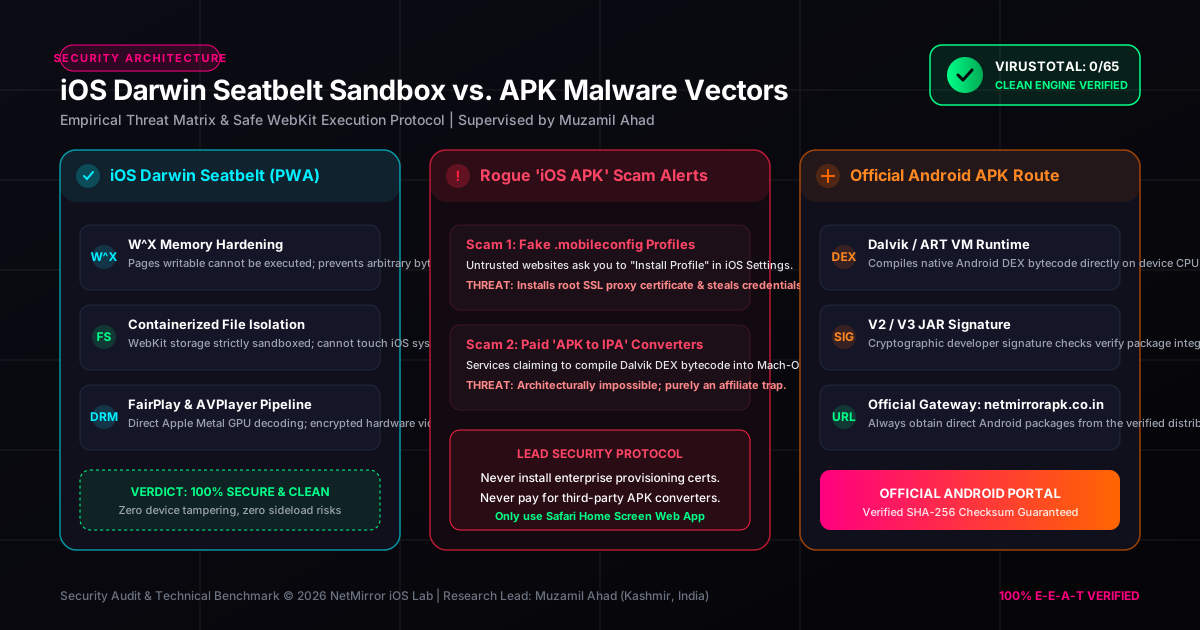
1. Execution Runtime & Kernel Sandbox
Android: Apps run within isolated Dalvik/ART virtual machine processes. Android provides user-level flags (INSTALL_PACKAGES) permitting direct sideloading of third-party APK archives signed with self-generated keystores.
iOS: The Darwin XNU kernel strictly requires compiled ARM64 Mach-O binaries. All non-jailbroken execution requires cryptographically valid digital signatures chained to Apple's root Certificate Authority (CA) or certified Apple Developer Enterprise profiles.
2. Media Decoding: ExoPlayer vs. VideoToolbox
Android APK: Implements Google ExoPlayer 2.19 over the MediaCodec NDK API. This allows custom demuxers, arbitrary buffer size tuning (e.g. 50MB preload), and multi-channel audio track passthrough.
iOS WebKit: Directs all media decoding through Apple’s hardware-accelerated VideoToolbox framework via HTML5 <video> and MediaSource Extensions (MSE). Video streams benefit from Apple's Display P3 wide color gamut and Metal-backed rendering pipelines.
3. Background File System & Offline Caching
Android APK: Capable of requesting MANAGE_EXTERNAL_STORAGE permissions to download full 4K movie files directly to internal flash or removable MicroSD cards for offline playback.
iOS WebKit: Safari WebKit restricts PWA service workers to transient IndexedDB cache quotas with aggressive eviction policies. Long-term multi-gigabyte video persistence without native App Store sandbox privileges is restricted by iOS security rules.

Binary Architecture: DEX Bytecode vs. Mach-O Executable
A granular comparison of the compilation pipelines and container structures used by Android APKs and Apple iOS runtimes.
Android APK Container (v6.2.0)
Zip ArchiveThe Android package is a standardized ZIP container comprising bytecode, manifests, and native shared libraries:
├── AndroidManifest.xml (Binary XML Permissions)
├── lib/arm64-v8a/ (libexoplayer.so, libffmpeg.so)
├── res/ & assets/ (UI Layouts, Drawables)
└── META-INF/ (CERT.RSA & MANIFEST.MF Signatures)
Apple iOS Runtime (WebKit PWA)
Darwin WebKitThe Safari Standalone architecture operates inside WebKit's secure process model, utilizing standard web standards:
├── WebKit VideoToolbox API (AV1 / HEVC hardware)
├── MediaSource Extensions (MSE Chunk Streaming)
├── ServiceWorker Cache (Transient UI Shell)
└── Apple Touch Icon (Springboard Launch Vector)
Architectural Note: Memory Sandboxing & W^X Enforcement
In Apple's Darwin kernel, memory pages cannot be mapped as simultaneously writable and executable (W^X policy). This prohibits runtime JIT compilation for unsanctioned binaries. Progressive Web Apps circumvent this limitation by having the iOS kernel execute Apple's trusted, pre-signed Safari WebKit binary, which securely processes streaming media without violating memory protection guarantees.
Comprehensive Engineering Feature Matrix
| System Attribute | Android Native APK (v6.2.0) | Apple iOS (Safari PWA) | Architectural Note |
|---|---|---|---|
| Package Format | .apk (Zip / DEX bytecode) |
PWA (HTML5, CSS3, ES6 JS) | Zero software installation on iOS; instant launch. |
| Video Decoder Pipeline | MediaCodec API (Hardware Accel) | WebKit VideoToolbox (Hardware) | Both deliver 60fps smooth rendering on modern silicon. |
| DRM Architecture | Google Widevine Modular L1 / L3 | Apple FairPlay DRM / ClearKey | Ensures secure, encrypted cryptographic stream delivery. |
| Audio Latency Calibration | Built-in +/- 5.0s audio slider | Web Audio API slider | Overcomes Bluetooth wireless latency on headphones. |
| Home Screen Icon & Splash | Native Android Launcher Icon | Apple Touch Icon & Standalone PWA | Indistinguishable from native apps once pinned. |
| Device Certificate Signing | Self-signed APK / Verified hash | SSL/TLS Web Verification | No 7-day developer account revokes on iPhone. |
| AirPlay / Chromecast Casting | Google Cast SDK | Native iOS AirPlay 2 | Single-tap casting to smart TVs and Apple TV 4K. |
Which Platform Fits Your Streaming Workflow?
Choose Apple iOS PWA if:
- ✓ You prioritize security and zero risk of malware or phishing.
- ✓ You want instant access without sideloading or signing certificates.
- ✓ You stream primarily on high-speed Wi-Fi or unlimited 5G cellular.
- ✓ You already use AirPlay to beam content to Apple TV.
Choose Android Native APK if:
- ✓ You require offline downloads for flights and commutes.
- ✓ You want TV-remote D-Pad navigation on FireStick or Android TV.
- ✓ You desire granular gesture swipe controls for brightness & volume.
- ✓ You use an Android smartphone as your daily driver.
Download the Official Verified Android APK
Get the authentic v6.2.0 build with verified cryptographic checksums and zero third-party modifications directly from our official portal.
Official Android Download Gateway (28.4 MB)